


ShopRite: Groceries & Savings
4.720.72K Reviews
App Specs
- Version
- 26.5.0
- Updated On
- License
- Free
- Downloads
- 1,000,000+
- Developer
- Wakefern
- Categories
- Shopping
- Platform
- Android, iOS
Screenshots
 Analysis by AppCompare
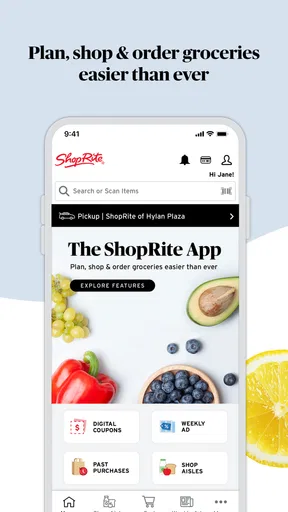
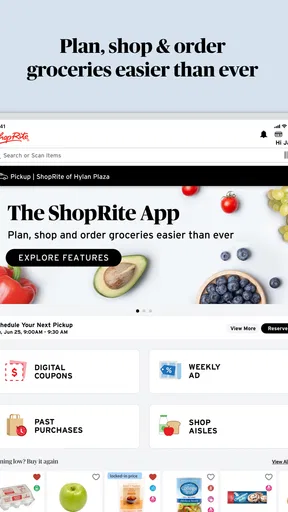
I use grocery apps for one simple reason: they should make a routine shop easier, not turn it into another project to manage. ShopRite: Groceries & Savings comes closest to that goal when I treat it as a planning tool rather than just a digital storefront. It brings weekly deals, coupons, shopping-list building, and pickup or delivery ordering into one place, which is especially useful when I already know where I prefer to buy groceries.
The app is made by Wakefern and sits in the shopping category. It is free to use, rated for Everyone, and runs on Android devices using version 9 or later. Its average rating is 4.7 from around 113 thousand ratings, while more than a million people have installed it. Those figures suggest that it serves a large, regular customer base, but they do not remove the need to learn its workflow. The best results come from using its planning features before I start adding products.
How I use ShopRite from list to checkout
I start with a list of what the household actually needs, then use the app to check whether any weekly offers fit those plans before deciding how to shop. That order helps me avoid letting promotions take over the basket, and it gives me a clear basis for reviewing quantities and alternatives. Once the list is settled, choosing pickup, delivery, or an in-store trip becomes a practical decision about my schedule and the items I want to select myself.
Starting with the weekly plan
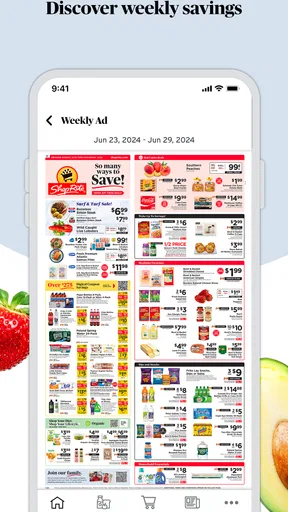
My preferred routine begins before I enter a store or open a delivery slot. I first look through the weekly deals and coupons, then build my shopping list around meals and household needs. This order matters. If I add items randomly and only check savings at the end, I am more likely to miss a relevant offer or buy something simply because it appeared in front of me.
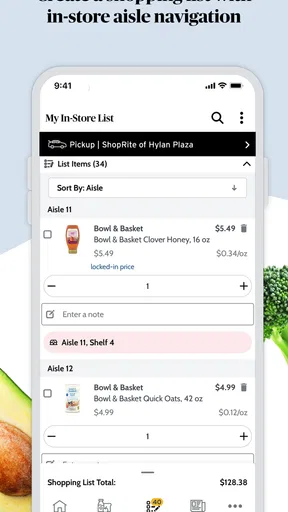
The list works best when I use it as a decision filter. I add the products I genuinely need, check whether a coupon applies, and then decide whether the promoted alternative makes sense. A discount is not automatically a saving if it pushes me toward a larger quantity, a flavor nobody at home wants, or an item I would not otherwise buy. The app makes the information easier to see, but I still have to make the sensible shopping decision.
For a normal weekday shop, I might prepare the list in the morning, review the available offers during a short break, and choose pickup later. That separates planning from collecting the groceries. It also reduces the temptation to wander through aisles and add unplanned items. If I need produce or a few fresh items immediately, I can use the same list as a checklist in the store rather than switching to paper notes.
Choosing between shopping methods
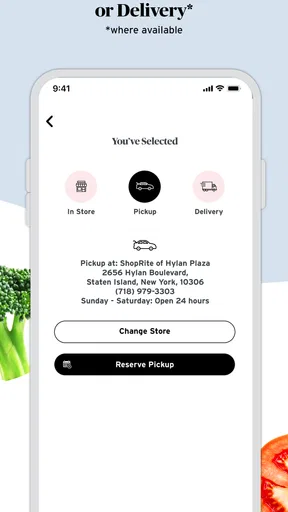
Pickup and delivery are useful for different reasons. Pickup suits me when I want to control the order in advance but can arrange a stop near the store. Delivery is more convenient when travel is the main problem, although I prefer to review the basket carefully because substitutions or unavailable products can affect the final result. The app gives me the ordering route, but it does not eliminate the practical differences between receiving groceries and selecting them myself.
Worth Reading Before You Choose

EA SPORTS FC Mobile 26 Is a Bigger Football Game, but It Takes Time

Flipboard Shows What News Apps Must Do Beyond the Feed

Switching to Android Auto Means Rethinking Your Driving Routine

Google Calendar Makes a Crowded Week Easier to Manage

Ludo King Makes the Most of the Minutes Between Plans

Baby Panda World Brings Quick Play to Modern Phones, but Its Game Library Feels Busy
In-store shopping remains a valid option. I would choose it for a small urgent purchase, for produce where appearance matters to me, or when I do not want to organize an order around collection or delivery. In that situation, the app still earns its place through the list and savings tools. This is an important strength: I do not have to commit every grocery trip to online fulfillment to get value from it.
One habit that saves time is separating “must have” items from “nice to have” items in my own planning notes before transferring them into the app. The shopping list is more useful when it reflects priorities. If an offer disappears or an item is unavailable, I know which products can be removed without rebuilding the entire shop.
What I check before placing an order
Before I submit a pickup or delivery order, I read through the basket as if I were checking a paper receipt. I look for duplicate entries, oddly sized products, and items added while browsing deals. I also revisit coupons rather than assuming every attractive offer has been applied automatically. This final pass is one of the most practical habits because a well-designed list can still contain a mistake made during a rushed session.
I pay particular attention to products that have several similar versions. A search result may show different sizes, flavors, or package counts, and the cheapest-looking option is not always the best value for my household. The app helps me find the choices, but comparing them still requires a moment of judgment. For a large weekly shop, that small pause is worthwhile.
Settings and account details worth checking
I would not rush through the initial setup. The useful parts of a grocery app depend on selecting the right shopping context, keeping account details current, and making sure the chosen store matches where I actually plan to shop. A list built for the wrong location can create unnecessary confusion when I move from browsing to fulfillment.
I also check notification preferences early. Deal reminders can be helpful when I want to plan around weekly savings, but too many alerts can make the app feel noisy. I prefer notifications that support a specific shopping routine rather than leaving every prompt enabled. If I only shop once a week, I do not need the app competing for attention every day.
Location and fulfillment choices deserve a similar review. Pickup and delivery are not interchangeable in practice, so I confirm the selected option before spending time on a detailed basket. This is particularly important when I am ordering for a busy day: discovering late in the process that I have chosen the wrong collection method defeats much of the convenience the app is supposed to provide.
Another setting-related habit is keeping my account information consistent with how I shop. If several people in a household use the same grocery plan, agreeing on one list-building routine prevents duplicate purchases. I find that the app works better when one person maintains the main list and others add requests in a consistent way, rather than everyone starting separate baskets.
Shortcuts that make repeat shopping faster
The biggest speed improvement comes from treating the shopping list as a reusable starting point. Instead of rebuilding a weekly shop from memory, I keep a mental core of recurring products and add the changing items around it. The app is then used for the variable part of the trip: current deals, meal ingredients, and household needs that have run out.
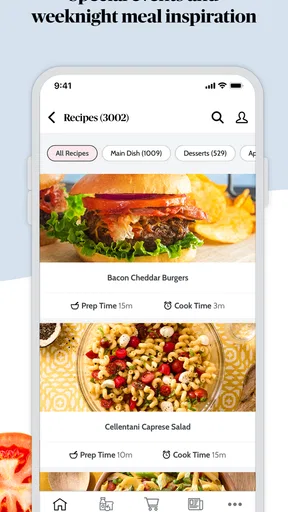
I also group my planning by purpose. I think about breakfast, packed lunches, dinners, and cleaning supplies before I search. That sounds basic, but it prevents the common pattern of opening one product page after another without knowing what the basket is meant to accomplish. A clear meal or household plan makes the app’s search and list features much more efficient.
For a family shop, I would review the list once before anyone begins adding items and once after. The first review removes vague requests such as “snacks” or “something for dinner,” while the second catches accidental duplicates. This is a useful compromise between letting everyone contribute and keeping the order manageable.
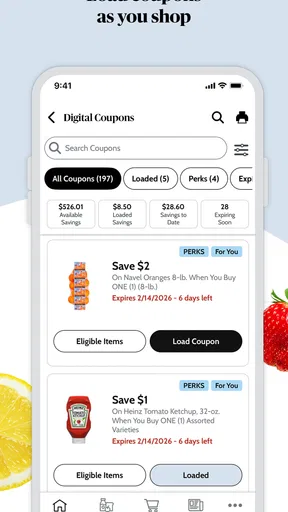
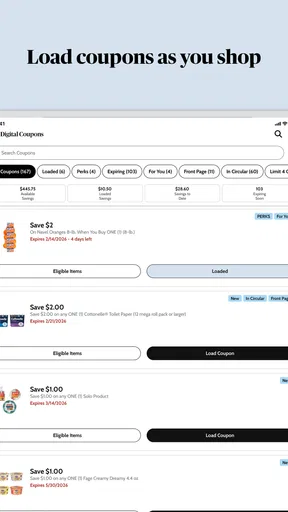
Coupons are most useful when they fit a planned purchase. I check them while building the list, not as entertainment after the basket is complete. I also avoid changing brands solely to chase a small saving unless the replacement is acceptable. That approach keeps the app serving my budget instead of allowing the promotions to dictate the entire shop.
For pickup, I prepare the order earlier than I think I need to. That gives me time to replace questionable items, rethink quantities, and inspect the final basket without pressure. For delivery, I use the same discipline and allow extra attention for products where a substitute would be inconvenient. The app makes ordering straightforward, but good timing remains one of the user’s responsibilities.
Where it is stronger than ordinary alternatives
Compared with a handwritten list, ShopRite is more useful when savings and fulfillment are part of the same trip. Paper is excellent for a quick reminder, but it cannot bring weekly deals, coupons, and an online order into one workflow. Compared with a generic notes app, this app has a direct connection to the grocery-shopping task rather than asking me to copy product information between tools.
It also has an advantage over using a separate coupon source and a separate delivery service. Keeping those steps together reduces the chance that I plan a discount in one place and forget to use it when ordering somewhere else. The benefit is not that every shop becomes cheaper; it is that the planning process becomes easier to audit.
That said, a generic grocery list may be better for someone who shops across several supermarkets. ShopRite is most valuable when it matches the store I regularly use. If my priority is comparing prices across unrelated retailers, a broader shopping tool may be more suitable. This app is focused, and that focus is both its strength and its boundary.
Limits I noticed in real use
The app cannot make grocery decisions for me. Deals may encourage browsing, and browsing can make a simple trip longer if I do not begin with a list. I have to resist treating every promotion as a recommendation. The more open-ended the shopping session, the more important it becomes to set a budget and a meal plan before using the savings section.
Online ordering also changes the kind of control I have. In a store, I can inspect produce, choose an exact package, and immediately adjust when something looks unsuitable. With pickup or delivery, convenience takes priority over that direct selection. I would use the app confidently for packaged staples and planned household items, while giving more thought to fresh products or anything where appearance and ripeness are central.
Another limitation is that a detailed basket takes concentration. Product variations, quantities, coupons, and fulfillment choices can all affect the final order. I do not consider that a flaw unique to this app, but it means the service is not a magic one-tap solution. People who dislike reviewing digital baskets may find a quick in-person trip less frustrating.
Users should also remember that the app is not a substitute for checking the actual order. I read the basket, confirm the shopping method, and make sure the list still reflects what I need. That habit answers one of the most practical questions a new user has: yes, the app can simplify the process, but only if I treat the final review as part of the process rather than an optional extra.
Who should use it and who should skip it
I recommend ShopRite to regular ShopRite customers who want one place for weekly savings, list preparation, and pickup or delivery ordering. It is especially appealing to households that repeat many purchases, people trying to reduce unplanned aisle browsing, and anyone who prefers preparing a grocery basket before leaving home.
I would be more cautious if I moved between many grocery chains, rarely buy enough for pickup or delivery to matter, or strongly prefer selecting every fresh item personally. In those cases, a paper list, a general notes app, or a retailer-neutral comparison tool may fit better. The free price makes trying it easy, but free does not mean it will match every shopping style.
The app is also a good fit for someone who wants practical savings without maintaining a complicated coupon system. I can browse offers, connect them to a planned list, and then decide what is genuinely worthwhile. The trade-off is that I need to stay deliberate. Users who want promotions to automatically optimize every purchase may find the experience less effortless than expected.
My verdict after building a repeatable routine
ShopRite: Groceries & Savings is at its best when I use it in a repeatable sequence: check the weekly offers, build a purposeful list, choose pickup or delivery, inspect the basket, and then complete the order. That workflow turns several ordinary grocery tasks into one organized habit without forcing me to shop online every time.
The current version is 26.5.0, and the app has been available since June 2, 2017. I mention that context because it feels designed for an established grocery routine rather than a one-off novelty. Its large audience and strong average rating reinforce that impression, but my recommendation is still based on fit: it works because the tools connect naturally to a ShopRite shopping habit.
My strongest advice is to start small. Build one realistic list, test the savings review, and try the fulfillment option that best matches your schedule. After that, add the shortcuts that genuinely help you, such as preparing the list early or separating essential items from flexible ones. The real advantage is not simply finding a coupon; it is making the whole grocery decision easier to repeat and check.
For me, that makes it a worthwhile free shopping app for regular customers, with enough flexibility for in-store trips and enough structure for pickup or delivery. I would not call it the right tool for every supermarket shopper, but if ShopRite is already part of your routine, ShopRite: Groceries & Savings can turn a scattered weekly errand into a calmer, more controlled process.
Pros
- Digital coupons and weekly deals can reduce your grocery bill.
- Shopping lists help organize items before visiting the store.
- Product search makes it easier to check available grocery options.
- Store locator provides nearby ShopRite locations and opening details.
- Order history can simplify repeat purchases and routine shopping.
Cons
- Some promotions require a ShopRite loyalty account to redeem.
- Product availability may vary between stores and change without notice.
- Online ordering may include pickup fees
- substitutions
- or delivery charges.
- The app can feel cluttered when browsing deals
- coupons
- and categories.
- Prices and savings may depend on location
- membership
- and promotion terms.
FAQs for ShopRite: Groceries & Savings
What is ShopRite: Groceries & Savings used for?
ShopRite: Groceries & Savings is designed to make grocery shopping more convenient and budget-friendly. After installing it, shoppers can browse products, check current prices and promotions, create a shopping list, and locate nearby ShopRite stores. Depending on availability in your area, the app may also support online ordering, pickup, delivery, digital coupons, and access to your ShopRite loyalty account.
Can I use digital coupons and savings offers in the ShopRite app?
Yes, the app provides access to digital coupons, weekly specials, and other promotional offers that can help reduce the cost of your shopping trip. You generally need to sign in or connect your Price Plus Club account so that selected coupons and rewards can be associated with your purchases. Offers can vary by store, product, account, and expiration date, so always review the terms before shopping.
Does ShopRite: Groceries & Savings support grocery delivery and pickup?
The app may allow you to place grocery orders for pickup or delivery, but the available services depend on your selected ShopRite location and local coverage. You can typically choose a store, add products to your cart, select an available time slot, and review fees or minimum-order requirements before checkout. Delivery areas, pickup schedules, substitutions, and service charges may differ between stores.
Do I need a ShopRite account or Price Plus Club card to use the app?
You can usually explore store information, browse products, and view some promotions without creating an account. However, signing in with a ShopRite account and linking your Price Plus Club card is recommended if you want personalized savings, digital coupons, shopping history, online ordering, or a synchronized shopping list. Account requirements may differ depending on the feature and your local ShopRite store.
Is ShopRite: Groceries & Savings free to download and use?
The ShopRite app is generally free to download from the official Android or iOS app store, and there is normally no separate charge for browsing products, viewing weekly circulars, or managing digital coupons. However, purchases made through the app still cost money, while delivery orders may include service, delivery, or small-order fees. Check the final checkout summary before confirming an order.


